
7 Best Smart Motion Sensor Light Switches of 2026
Seven Wi-Fi and Z-Wave motion sensor switches compared on wiring, voice assistants, and features.
 By Ethan Cole
Updated November 5, 2026
A smart motion sensor switch turns lights on automatically and adds app control, schedules, and voice assistants. Most need a neutral wire and a 2.4GHz Wi-Fi network.
This list covers Wi-Fi and Z-Wave models. For simple sensor switches see our motion sensor light switches guide, and for dimmers see our motion sensor dimmer switches guide.
Safety note: hardwired fixtures and wall switches connect to household wiring. Turn off the breaker and confirm the power is off before you start, match the fixture to the box, and use a licensed electrician if you are not experienced with home wiring. Check the load rating, the box size, and your local code, and look for a UL or ETL mark. Listings differ; we describe what each maker lists.
All Products Compared
| Product | Best For | Wiring | Rated Load | Control |
|---|---|---|---|---|
| Kasa Smart Wi-Fi Motion Sensor Switch (KS200M) | Simple Wi-Fi Sensor | Single pole, neutral required | 300W CFL/LED, 600W incandescent (listed) | Wi-Fi, Alexa and Google Home |
| Kasa Smart Motion Sensor Dimmer Switch (ES20M) | Wi-Fi With Dimming | Single pole, neutral required | See listing | Wi-Fi, dimmer |
| Leviton Decora Smart Motion Sensing Dimmer (D2MSD) | Apple Home Support | Wired or wire-free 3-way | See listing | Wi-Fi, Apple Home |
| ELEGRP Smart Motion Sensor Switch, 3-Way (Wi-Fi) | Sound-Sensing 3-Way | 3-way, neutral required | See listing | Wi-Fi, sound sensing |
| HQL Smart Radar Motion Sensor Light Switch | Radar Sensing | Single gang, neutral required | See listing | Wi-Fi, Smart Life or Tuya app |
| Milfra Smart Motion Sensor Light Switch | Siri Support | Single pole or 3-way, neutral required | See listing | Siri, Alexa, Google Home |
| Enbrighten Z-Wave Smart Motion Sensor Light Switch | Z-Wave Homes | Hub required | See listing | Z-Wave, SmartThings, Alexa |
| Award | Product | WikiHomeLED Score About WikiHomeLED ScoreThe WikiHomeLED Score is our own rating from 0 to 10, calculated the same way for every product from Amazon buyer ratings, adjusted for how many ratings each product has. It is never influenced by manufacturers, retailers, or affiliate commissions. Learn more › | Price | |
|---|---|---|---|---|
 Kasa Smart Wi-Fi Motion Sensor Switch KS200M |
$22.99 | Buy | ||
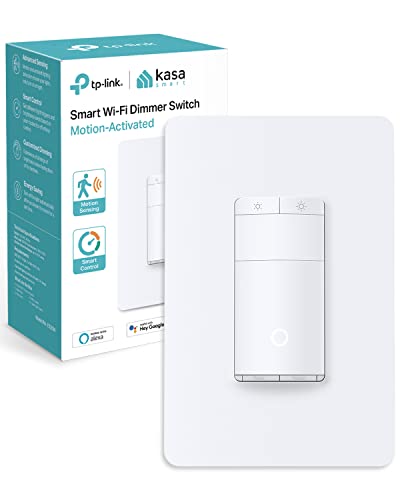 Kasa Smart Motion Sensor Switch, ES20M |
$22.99 | Buy | ||
 Leviton Decora Smart Motion Sensing Dimmer |
$46.64 | Buy | ||
 ELEGRP Smart Motion Sensor Switch |
$36.99 | Buy | ||
 HQL Smart Radar Motion Sensor Light Switch 1 Gang |
$18.99 | Buy | ||
 Milfra Smart Motion Sensor Light Switch,Motion |
$18.19 | Buy | ||
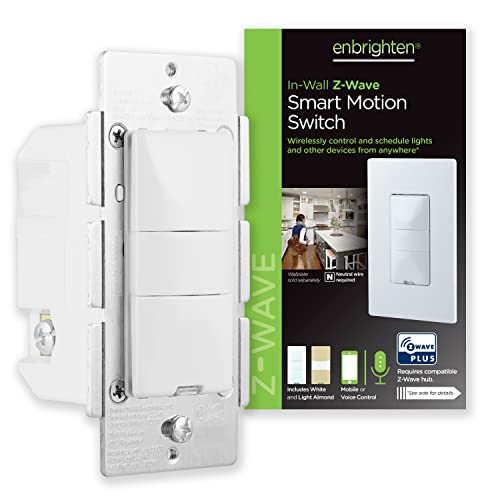 Enbrighten Z-Wave Smart Motion Sensor Light |
$39.99 | Buy |
Kasa Smart Wi-Fi Motion Sensor Switch KS200M
Kasa Smart Motion Sensor Switch, ES20M
Leviton Decora Smart Motion Sensing Dimmer
ELEGRP Smart Motion Sensor Switch
HQL Smart Radar Motion Sensor Light Switch 1 Gang
Milfra Smart Motion Sensor Light Switch,Motion
Enbrighten Z-Wave Smart Motion Sensor Light
Top 3 Smart Motion Sensor Light Switches Reviewed
#1 Kasa Smart Wi-Fi Motion Sensor Switch (KS200M): Simple Wi-Fi Sensor
Why We Picked It
A Kasa Wi-Fi motion sensor switch that works with Alexa and Google Home with no hub. It has Smart Mode and Away Mode for routines, is rated for 600W incandescent and 300W CFL or LED, and needs a neutral wire. UL certified with a two-year warranty, per the listing.
Key Specifications
- Wiring: Single pole, neutral required (listed)
- Rated Load: 300W CFL/LED, 600W incandescent (listed)
- Control: Wi-Fi, Alexa and Google Home
- Wi-Fi: 2.4GHz (listed)
- Warranty: 2 years (listed)
| Pros | Cons |
|---|---|
|
|
Things to Consider
The app guides setup, but the listing recommends consulting an electrician if you are unfamiliar with wiring.
Best For
A smart home that wants app control and Alexa or Google.
Skip It If
You have a 3-way circuit or no neutral.
Check current pricing and availability for the Kasa Smart Wi-Fi Motion Sensor Switch (KS200M).
#2 Kasa Smart Motion Sensor Dimmer Switch (ES20M): Wi-Fi With Dimming
Why We Picked It
Kasa’s ES20M adds dimming to a Wi-Fi motion switch. It needs a neutral wire and 2.4GHz Wi-Fi, is single pole only, works with Alexa and Google Home with no hub, and detects daylight so lights stay off during the day.
Key Specifications
- Wiring: Single pole, neutral required (listed)
- Rated Load: See listing
- Control: Wi-Fi, dimmer
- Setup: Kasa or Tapo app (listed)
| Pros | Cons |
|---|---|
|
|
Things to Consider
Check that your bulbs are dimmable.
Best For
A bedroom or bathroom where brightness control matters.
Skip It If
You want a 3-way switch.
Check current pricing and availability for the Kasa Smart Motion Sensor Dimmer Switch (ES20M).
#3 Leviton Decora Smart Motion Sensing Dimmer (D2MSD): Apple Home Support
Why We Picked It
A Wi-Fi motion sensing dimmer that works with My Leviton, Alexa, Google Assistant, and Apple Home. The title says it works as a wired or wire-free 3-way, and a light sensor keeps lights off unless needed.
Key Specifications
- Wiring: Wired or wire-free 3-way (listed)
- Rated Load: See listing
- Control: Wi-Fi, Apple Home
- Control: My Leviton, Alexa, Google, Apple Home (listed)
| Pros | Cons |
|---|---|
|
|
Things to Consider
The listing mentions Room Response to control other Decora Smart devices, which adds value only if you own them.
Best For
A home using Apple Home or Decora Smart.
Skip It If
You want a plain sensor switch.
Check current pricing and availability for the Leviton Decora Smart Motion Sensing Dimmer (D2MSD).
Other Options Worth Considering
How to Choose a Smart Motion Sensor Switch
Ecosystem
Pick a switch that works with your assistant: Alexa, Google, Siri, SmartThings, or the maker’s app.
Neutral Wire
Nearly all smart switches need a neutral. Check your box first.
Wi-Fi Band
Many need 2.4GHz Wi-Fi. Z-Wave models need a hub.
Dimming and 3-Way
Choose a dimmer if you want brightness control, and a 3-way model if two switches control the light.
How We Evaluate Smart Motion Sensor Light Switches
We did not install or run these products. We compared manufacturer specifications and Amazon listing details, selected November 6, 2026. We could not retrieve current Amazon star ratings or rating counts for these listings, so they carry no WikiHomeLED Score, we show no star ratings, and the order is our editorial judgment of the listed specifications, not a score. We looked at ecosystem support, wiring requirements, dimming, 3-way support, and any safety listing. We kept one listing per product family and no more than three per brand. Battery capacity, lumen, range, and runtime figures are as published by each seller and are not our measurements; where a listing is vague or contradicts itself, we say so. Read recent customer reviews before you buy. The full method is on our How We Review page.
Frequently Asked Questions
Do smart switches work without Wi-Fi?
Many still work as sensor switches but lose app features. Check the listing.
Do I need a hub?
Kasa and the Wi-Fi models do not. The Enbrighten Z-Wave model does.
Do they need a neutral wire?
Most do.
Can I install one myself?
If you are comfortable with household wiring, turn off the breaker first. Otherwise hire a licensed electrician.
Final Verdict
Kasa is our first pick for a simple, hub-free smart sensor switch, Leviton for Apple Home, and ELEGRP for a 3-way option. Enbrighten is the one for a Z-Wave home.
More in Motion Sensor Lights and Kitchen and Closet Lighting. See also our 3 way motion sensor light switches and motion sensor dimmer switches guides.
About the author
Ethan Cole leads research and editing at WikiHomeLED, comparing LED lighting for the home through manufacturer specs, manuals, safety listings and owner feedback. Every product is scored against the criteria on our How We Review page, and picks are updated when models change.