
Elgato Key Light Review
The Elgato Key Light is a Wi-Fi LED panel for streamers with 2,800 lumens listed and app control. Here is who it suits and who should look elsewhere.
 By Ethan Cole
Updated November 1, 2026
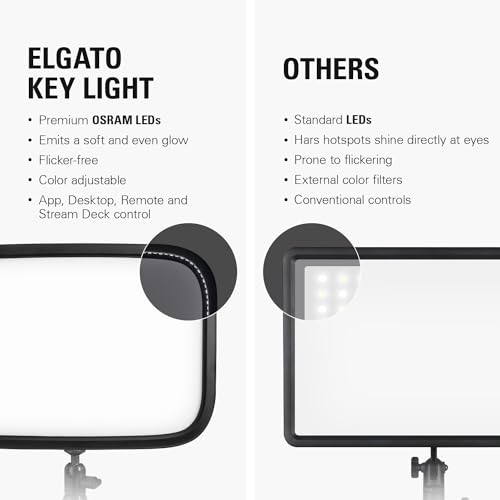
The Elgato Key Light is a flat LED panel for streaming and video that you control from a computer over Wi-Fi. Elgato lists 2,800 lumens from 160 OSRAM LEDs behind an opal glass face, with color from 2900K to 7000K.
This review covers what is in the box, the light itself, app control, and who should save money with a smaller light. For other panels, see our best key lights for streaming.
Our Verdict
The Key Light is the panel to buy if you stream from a desk and want strong, even light you adjust from the PC. It is rated 4.5 stars on about 4,300 Amazon ratings at the time of review (October 31, 2026), and it tops our streaming key light guide.
If you only need a light for video calls, it is more light (and more money) than you need; the Logitech Litra Glow or a clip-on light will do.

Elgato Key Light, Professional 2800 Lumens Studio



As an Amazon Associate we earn from qualifying purchases. Product prices and availability are accurate as of the date/time indicated.
Key Specifications
| Feature | Specification (per Elgato’s listing) |
|---|---|
| Output | 2,800 lumens |
| LEDs | 160 OSRAM |
| Color temperature | 2900K to 7000K |
| Diffuser | Opal glass face |
| Control | Wi-Fi, Elgato Control Center app (PC, Mac) |
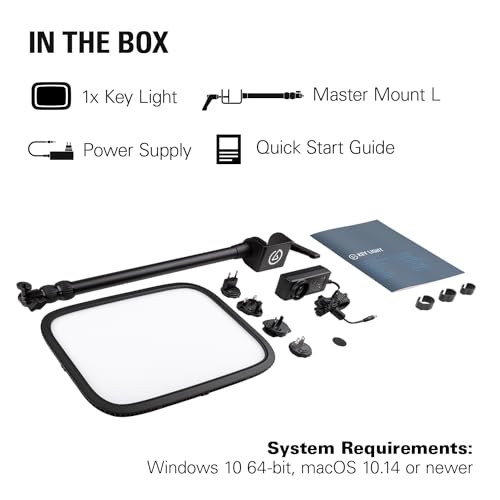
| In the box | Key Light, metal pole mount, power supply, quick start guide |
| Weight | 2.9 lb |
| Warranty | 2 years |
Design and Mounting
The panel ships with a metal pole mount and a power supply, so it runs from the wall, not USB. That means more output than USB lights but one more cable to route. At 2.9 pounds it needs the pole mount rather than a monitor clip.
Elgato says the LEDs run with low heat compared with softboxes, and the opal glass spreads light evenly across the face of the panel, so there are no visible LED dots.
Light Output and Color
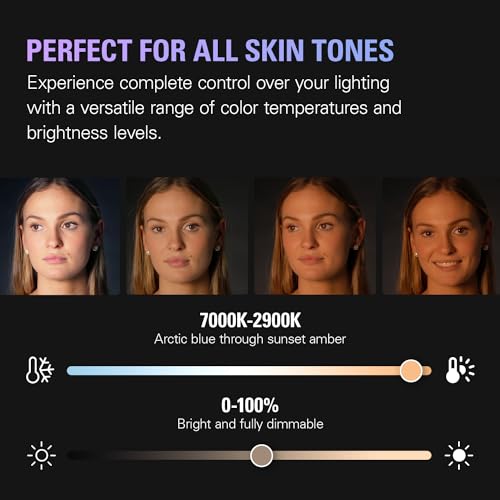
2,800 lumens is the highest figure listed among the streaming panels we compared. In practice you will run it well below full power at desk distance; the extra headroom helps in a larger room or with a bright background. The 2900K to 7000K range covers warm lamp light to cool daylight.
App Control
You switch it on and off and set brightness and color temperature in Elgato’s Control Center app on a PC or Mac over Wi-Fi. That keeps your hands off the panel during a stream. It also means the light has to join your Wi-Fi network during setup.
Pros and Cons
| Pros | Cons |
|---|---|
|
|
How It Compares
Against the Litra Glow, the Key Light is a much larger, wall-powered panel; the Litra Glow is a small USB light that sits on the monitor. See Elgato Key Light vs Logitech Litra Glow. Against budget panels like the NEEWER GL25B or RALENO 13 inch panel, you pay for the higher output figure, Wi-Fi app control, and the longer rating history.
Who Should Buy It
Streamers and video creators who want one strong key light placed to the side of the camera and controlled from the computer.
Who Should Look Elsewhere
Anyone who only takes video calls, has no room for a pole mount, or wants a USB or battery light. Our video conference light picks cost far less.
Check current pricing and availability for the Elgato Key Light.
How We Evaluated It
We did not set this light up ourselves. Specifications come from the seller’s Amazon listing at the time of review (October 31, 2026), and the rating figures are Amazon star ratings and rating counts on that date. How we score and compare products is on our How We Review page.
Frequently Asked Questions
Does the Elgato Key Light need Wi-Fi?
Yes. Elgato lists Wi-Fi app control through its Control Center app on PC and Mac.
Does the Elgato Key Light come with a mount?
The listing includes a metal pole mount and a power supply.
Is the Elgato Key Light USB powered?
No. It uses the included power supply. For a USB option, see the Logitech Litra Glow or Elgato Key Light Neo.
About the author
Ethan Cole leads research and editing at WikiHomeLED, comparing LED lighting for the home through manufacturer specs, manuals, safety listings and owner feedback. Every product is scored against the criteria on our How We Review page, and picks are updated when models change.