
10 Best Monitor Backlights of 2026
Ten monitor backlight kits compared: PC screen sync strips, a Hue gradient strip, and a plain white bias light, with the software and setup each one needs.
 By Ethan Cole
Updated October 30, 2026
A monitor backlight is an LED strip stuck to the back of a computer display. Most kits sold for monitors follow the colors on screen, and almost all of them do it the same way: a program on your computer reads the picture and sends colors to the strip over USB. That is different from TV kits, which use a camera or an HDMI box. It also means the software you install matters as much as the strip, and that most of these kits will not follow a game console or a streaming stick.
This guide compares ten kits, from a 39 inch white bias strip to RGB strips that mirror the screen on four sides. For each one we list the sync software, which operating systems it supports, and the sizes it is sold for. If your screen is a 34 inch ultrawide, see our guide to monitor backlights for ultrawide monitors, and for a tighter budget, monitor backlights under $30.
All Products Compared
| Product | Best For | Follows the Screen | Listed Monitor Size | Sync Software | Computer Support |
|---|---|---|---|---|---|
| Govee Gaming Light for Monitor G1 | Best Overall | Yes (PC software) | 27 to 34 inch, curved | Govee Desktop + Govee Home app | PC (Mac not listed) |
| Philips Hue Gradient PC Lightstrip | Best for Hue Homes | Yes (Hue app) | 24 to 27 inch | Hue app, Hue Bridge required | Not stated on listing |
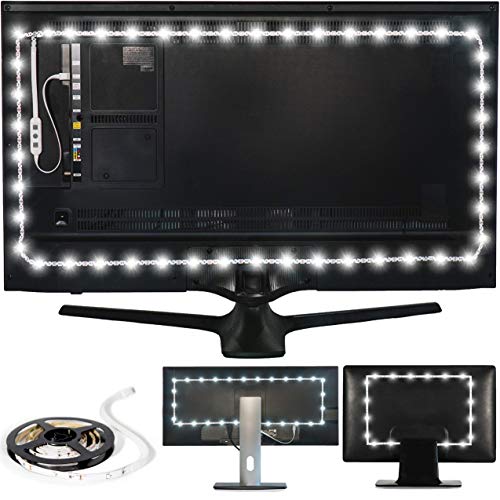
| Luminoodle Bias Lighting (up to 24 inch) | Best Plain White Bias Light | No (6500K white only) | Up to 24 inch | None, USB on/off | Any USB port |
| wacuaao 27 Inch Monitor Backlight | Best Skydimo Kit | Yes (PC software) | 27 inch | Skydimo | Windows 10+, macOS 13+ |
| Fiotura G100 Monitor Backlight (27 inch) | Longest Rating History, Skydimo | Yes (PC software) | 24 to 32 inch | Skydimo | PC and Mac |
| YIKEMJERP Monitor Backlight | Windows Only, No Login | Yes (PC software) | 19 to 32 inch | Own app | Windows only |
| hnlife Skydimo 27 Inch Monitor Backlight | Three-Sided Skydimo Strip | Yes (PC software) | 27 inch (3 sides) | Skydimo | Not stated on listing |
| RZJSKJZM Monitor LED Backlight (27 inch) | Sized Variants, SyncLight | Yes (PC software) | 27 inch | SyncLight | PC and Mac |
| DS Gaming Monitor Light | Three or Four Sides, Windows | Yes (PC software) | 27 to 32 inch (listing conflicts) | DX-Lighting | Windows |
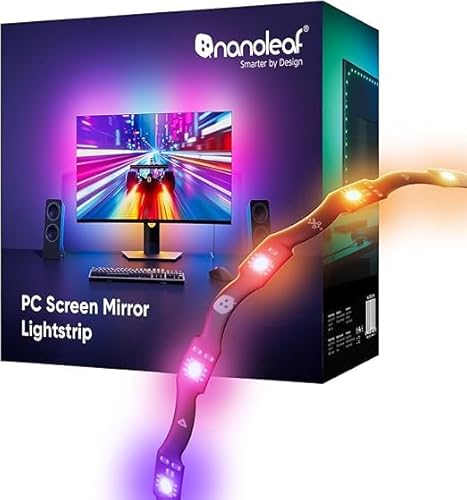
| Nanoleaf PC Screen Mirror Lightstrip | Tunable White, USB-C | Yes (PC software) | 27 to 32 inch | Nanoleaf Desktop App | Windows and Mac |
| Award | Product | WikiHomeLED Score About WikiHomeLED ScoreThe WikiHomeLED Score is our own rating from 0 to 10, calculated the same way for every product from Amazon buyer ratings, adjusted for how many ratings each product has. It is never influenced by manufacturers, retailers, or affiliate commissions. Learn more › | Price | |
|---|---|---|---|---|
 Govee Gaming Light for Monitor G1 |
8.1/10 | $49.99 | Buy | |
| Best Premium |
 Philips Hue White and Color Ambiance Gradient PC |
8.2/10 | $107.95 | Buy |
| Best Overall |
 Luminoodle Bias Lighting |
8.6/10 | $15.99 | Buy |
| Best Value |
 wacuaao 27 Inch Monitor Backlight |
8.1/10 | $29.88 | Buy |
 Fiotura G100 LED Monitor Backlights for PC & Mac |
7.9/10 | $29.99 | Buy | |
 YIKEMJERP Monitor Backlight for Win PC |
8.0/10 | $9.99 | Buy | |
 hnlife Skydimo 27'' ARGB Led Strip Lights |
8.1/10 | $30.99 | Buy | |
| Best Budget |
 RZJSKJZM Monitor LED Backlights |
8.1/10 | $18.98 | Buy |
 DS Gaming Monitor Light, Backlight with Screen |
8.0/10 | $19.80 | Buy | |
 Nanoleaf PC Screen Mirror Lightstrip |
8.1/10 | $34.99 | Buy |
Govee Gaming Light for Monitor G1
Philips Hue White and Color Ambiance Gradient PC
Luminoodle Bias Lighting
wacuaao 27 Inch Monitor Backlight
Fiotura G100 LED Monitor Backlights for PC & Mac
YIKEMJERP Monitor Backlight for Win PC
hnlife Skydimo 27'' ARGB Led Strip Lights
RZJSKJZM Monitor LED Backlights
DS Gaming Monitor Light, Backlight with Screen
Nanoleaf PC Screen Mirror Lightstrip
Top 3 Monitor Backlights Reviewed
#1 Govee Gaming Light for Monitor G1: Best Overall
Why We Picked It
Among kits that follow the screen, the Govee G1 has by far the longest rating history in this guide: 4.2 stars on more than 800 Amazon ratings at the time of review. The next screen-sync kit, the Fiotura G100, has about 190, and most of the rest have fewer than 150.
Govee lists the strip for 27 to 34 inch monitors, including curved ones, and says it covers all four sides of the screen. Colors are read on the computer through Govee Desktop software, which Govee calls VibraMatch, and the Govee Home app handles scenes and music modes. The listing also names Razer Chroma support and syncing with other Govee gaming lights through Govee’s PC DreamView feature, which matters if you already own Govee light bars.
Key Specifications
- Strip length: 5.9 ft, listed for 27 to 34 inch monitors
- Sync: Govee Desktop software (VibraMatch) reads the screen
- Control: Govee Home app, 123 scene modes and 11 music modes listed
- Works with: Razer Chroma, other Govee gaming lights (PC DreamView)
- Curved screens: listed as supported
| Pros | Cons |
|---|---|
|
|
Things to Consider
Like every PC-software kit, the G1 follows what the computer draws. It cannot follow a PS5, Xbox, or streaming stick plugged into the same monitor. Govee’s own note that protected streaming content may not sync applies to most kits in this guide.
Best For
PC gamers with a 27 to 34 inch monitor, flat or curved, who want the kit with the most buyer feedback, especially if they already use Govee or Razer lighting.
Skip It If
You use a Mac and need confirmed support, or you mainly play on a console through the monitor. For a Mac, look at the wacuaao or Nanoleaf kits below.
Check current pricing and availability for the Govee Gaming Light for Monitor G1.
#2 Philips Hue Gradient PC Lightstrip: Best for Hue Homes
Why We Picked It
The Hue Gradient PC Lightstrip has the highest WikiHomeLED Score of the screen-sync kits in this guide (82), with 4.4 stars on about 150 Amazon ratings at the time of review. It is made for 24 to 27 inch monitors and, like other gradient Hue strips, shows several colors along the strip at once.
It is also the only kit here that joins a whole-home lighting system. It needs a Hue Bridge, and through the Hue app it works with Alexa, Google Assistant, and Apple HomeKit, and the listing mentions Matter through the bridge. Philips says the app sets how the lights react to what is on the monitor, so the strip can match the screen and the Hue lamps in the rest of the room together.
Key Specifications
- Size: 24 to 27 inch monitors
- Hub: Hue Bridge required
- Control: Hue app; Alexa, Google Assistant, HomeKit listed
- Mounting: mounts included that bend around the monitor’s corners
- Model number on listing: 578294
| Pros | Cons |
|---|---|
|
|
Things to Consider
Without a Hue Bridge this strip does nothing, so price the bridge in if you do not have one. If you only want a glow behind one monitor and no smart home tie-in, the Skydimo kits do the same core job for much less.
Best For
People who already run Philips Hue lights and want the monitor glow to match the room.
Skip It If
You do not own a Hue Bridge and do not plan to, or your monitor is larger than 27 inches.
Check current pricing and availability for the Philips Hue Gradient PC Lightstrip.
#3 Luminoodle Bias Lighting for Monitors up to 24 Inch: Best Plain White Bias Light
Why We Picked It
Not everyone wants color. The Luminoodle is a 39 inch (1 m) strip of 6500K white LEDs that plugs into any USB port and lights the wall behind the screen. That is classic bias lighting: a neutral white close to the color of a calibrated display, used to soften the contrast between a bright screen and a dark wall.
It has the highest WikiHomeLED Score in this guide, 86, from 4.5 stars on more than 12,000 ratings. Those ratings are shared across the Luminoodle bias lighting line, which includes TV sizes, so treat the number as a rating for the line rather than this exact strip. We place it third rather than first because it does not follow the screen, which is what most people searching for a monitor backlight are after.
Key Specifications
- Strip length: 39 inches (1 m)
- Color: 6500K white only
- Power: 5V, 1A USB (5 W listed)
- Size: monitors up to 24 inch
- Mounting: 3M adhesive
| Pros | Cons |
|---|---|
|
|
Things to Consider
The strip turns on and off with the USB port it is plugged into. On many monitors and PCs the USB ports stay powered in standby, so it may stay lit until you unplug it. Check how your port behaves.
Best For
Office and editing setups where you want a neutral white glow behind a 24 inch or smaller monitor without installing anything.
Skip It If
You want the light to change with games or video, or your monitor is larger than 24 inches.
Check current pricing and availability for the Luminoodle Bias Lighting for Monitors up to 24 Inch.
How to Choose Monitor Backlights
Check the Sync Software Before the Strip
Nearly every screen-sync monitor kit is a strip plus a desktop program. Govee uses Govee Desktop, Philips uses the Hue app, wacuaao, Fiotura, and hnlife use Skydimo, RZJSKJZM uses SyncLight, DS uses DX-Lighting, and Nanoleaf uses its Desktop App. Check that the program supports your operating system: YIKEMJERP and DS list Windows only, and Govee does not state Mac support.
PC Sync Means No Console Sync
Software sync reads what your computer is drawing. A PS5, Xbox, or streaming stick plugged into the same monitor bypasses the computer, so the lights will not follow it. For console play on a monitor, a camera kit is the workaround; see our guide to TV backlights with a camera, some of which list PC monitors.
Match the Size, and Count the Sides
Kits are sold by monitor size, often as 24, 27, 32, and 34 inch versions of the same strip. A 16:9 monitor’s outer edge is about 2.72 times its diagonal: about 5.4 ft for 24 inch, 6.1 ft for 27 inch, and 7.3 ft for 32 inch. Strips are mounted in from the edge, so they run shorter than that, but a 39 inch strip will only cover part of a 24 inch screen. Some kits cover three sides and leave the bottom bare, which is normal on a monitor stand.
USB Ports and Power
These kits run on USB. Some, like wacuaao, ask for a USB 3.0 port or a powered hub, and longer strips may come with two USB plugs. If the lights flicker or look dim, a powered hub is the usual fix.
Copy-Protected Video
Several sellers, including Govee, Fiotura, and YIKEMJERP, warn that some streaming video is protected, so the software cannot read it and the lights will not follow. Games and most desktop content are not affected.
How We Evaluate Monitor Backlights
We rank kits with the WikiHomeLED Score, which combines Amazon rating, rating volume, and listing completeness on the same scale for every product; the method is on our How We Review page. We did not install these kits ourselves. Every feature in this guide comes from the seller’s listing at the time of review, and where a listing contradicts itself, we say so. Because most people searching for a monitor backlight want the lights to follow the screen, we placed screen-sync kits first and the Luminoodle white strip third even though its score is higher. Ratings shared across sizes are marked as pooled. Kits with fewer than 20 ratings, such as the MIHEAL and ZIWJGPCCV monitor strips, did not make this list.
Frequently Asked Questions
Do monitor backlights work with a PS5 or Xbox?
Most do not follow the screen with a console. They read the picture through software on a PC or Mac, so a console plugged into the monitor bypasses them. You can still use static colors or music mode. Camera-based TV kits that list PC monitors can follow a console, but you need to mount a camera above the screen.
Do monitor backlights work on a Mac?
Some do. wacuaao lists macOS 13 or later, Nanoleaf lists Windows and Mac, the Hue listing does not name an operating system, and Fiotura and RZJSKJZM say PC or Mac. YIKEMJERP and DS are Windows only, and Govee does not state Mac support for the G1.
What is bias lighting for a monitor?
Bias lighting is a light behind the screen that brightens the wall so the screen is not the only bright thing in a dark room. The common choice is white near 6500K, which matches the white point most displays are set to. The Luminoodle strip in this guide is a plain bias light; several RGB kits, like Nanoleaf and wacuaao, can also be set to a static white.
Why don’t the lights change with Netflix or other streaming video?
Some streaming services protect their video so other programs cannot capture it. Sync software reads the screen the same way a capture tool does, so on protected content it sees nothing to match. Several sellers note this on their listings.
Can I use a TV backlight on a monitor?
Yes, if the strip length fits. Many TV kits for 32 to 50 inch screens also list PC monitors. TV kits use a camera or music mode, not desktop software, so they behave differently. See our guide to TV backlights.
Final Verdict
The Govee G1 is the screen-sync kit with the most buyer feedback and covers 27 to 34 inch monitors, flat or curved, as long as you are on a PC. Hue owners should pick the Hue Gradient PC Lightstrip and accept the bridge and the price. If you only want a neutral glow behind a small monitor, the Luminoodle white strip has a long rating history and needs no software. For Mac users on a budget, the wacuaao kit is the clearest about what it supports. More kits for every monitor size are in our monitor backlights category.
About the author
Ethan Cole leads research and editing at WikiHomeLED, comparing LED lighting for the home through manufacturer specs, manuals, safety listings and owner feedback. Every product is scored against the criteria on our How We Review page, and picks are updated when models change.