
Razer Aether Standing Light Bars Review
Razer's Aether Standing Light Bars bring Chroma RGB and Matter to a reversible pair of desk bars. We review the features and the weak rating record.
 By Ethan Cole
Updated November 2, 2026
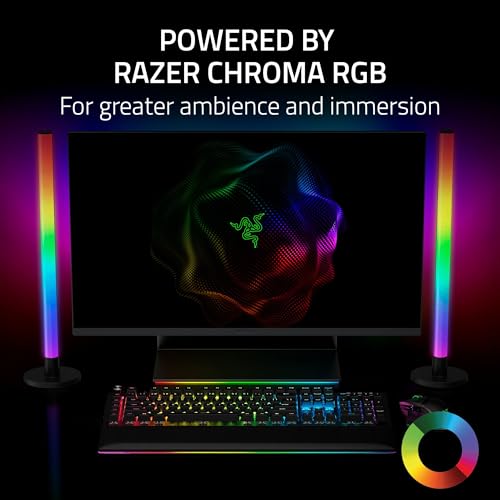
Razer’s Aether Standing Light Bars are a pair of desk bars built for Razer Chroma setups. They turn to light the front or the wall behind, take a different color on each bar, run from one USB-C cable, and connect to Matter, Alexa, and Google Home.
This review covers the features, the Razer Gamer Room app, and why the rating record keeps it below Govee. For every desk bar, see the best desk light bars.
Our Verdict
The Aether bars make sense if your desk already runs on Razer Chroma and you want lights that match it natively. They are rated 3.9 stars on about 53 Amazon ratings at the time of review (October 31, 2026), the weakest record among the major-brand bars we compared, and they are among the most expensive.
For most gamers, Govee’s bars offer Razer Chroma support with a much stronger rating history.

Razer Aether Standing Light Bars, Chroma RGB




As an Amazon Associate we earn from qualifying purchases. Product prices and availability are accurate as of the date/time indicated.
Key Specifications
| Feature | Specification (per Razer’s listing) |
|---|---|
| Bars | 2, standing |
| Lighting | Reversible front or back, Chroma RGB, 16.8M colors |
| Per-bar color | Yes, within the same Chroma effect |
| Power | Single USB-C cable, no adapter brick |
| Smart home | Matter, Alexa, Google Home |
| App | Razer Gamer Room |
Reversible Lighting
Each bar can face you, for lighting that reacts to games in your line of sight, or face the wall, for a softer wash behind the desk. Razer says you can set colors on each bar separately even while both run the same Chroma effect.
Power and Smart Home
One USB-C cable powers the pair, with no separate adapter brick, which keeps the desk tidy. The bars are part of Razer’s Gamer Room line, controlled in the Razer Gamer Room app, and support Matter, so they also work in Alexa and Google Home.
Pros and Cons
| Pros | Cons |
|---|---|
|
|
How It Compares
Against the Govee Gaming Light Bars Pro, both list Razer Chroma and Matter; Govee adds Govee Desktop screen sync on Windows and has a far higher rating. The Govee H6047 also supports Chroma through Razer Synapse 3. See the best gaming light bars.
Who Should Buy It
- Desks built around Razer peripherals and Chroma
- Buyers who want a single USB-C cable
- Matter homes that also want Razer’s app
Who Should Look Elsewhere
- Anyone who wants a proven rating history (Govee H6047 or Pro)
- Budget buyers
- Mac users who want screen sync (see RIYO in our desk guide)
Check current pricing and availability for the Razer Aether Standing Light Bars.
How We Evaluated It
We did not set up the Aether bars ourselves. This review is based on Razer’s Amazon listing and the product’s rating history at the time of review, compared on the same criteria as every bar in our gaming light bars category. Our method is on the How We Review page.
Frequently Asked Questions
Do Razer Aether light bars need an adapter?
Razer says the pair runs from a single USB-C cable with no extra adapter brick.
Do Razer Aether light bars work with Alexa?
Yes. Razer lists Matter, Alexa, and Google Home.
Are Razer Aether light bars worth it?
For a full Razer Chroma setup, they match natively. Otherwise, their rating record is weaker than Govee bars that also support Chroma.
About the author
Ethan Cole leads research and editing at WikiHomeLED, comparing LED lighting for the home through manufacturer specs, manuals, safety listings and owner feedback. Every product is scored against the criteria on our How We Review page, and picks are updated when models change.