
9 Best TV Backlights Without Camera of 2026
If you want immersive TV backlighting without a privacy-compromising camera, HDMI sync box kits are the solution. This guide compares the top options for 2026 based on screen size compatibility, sync technology, and smart home features.
 By Ethan Cole
Updated October 21, 2026
Choosing the right TV backlight without a camera means finding a kit that uses an HDMI sync box to read the video signal directly from your external devices. Because nothing has to watch the screen, there is no camera to mount on top of the TV, no calibration step, and no interference from room lighting or reflections. The key considerations are the sync box’s HDMI version (it decides which resolutions and refresh rates pass through), the length and density of the LED strip for your screen size, and how you want to control the lights. You can explore more options in our TV Backlight Kits category, and if you are open to camera-based kits as well, see our main guide to the best TV backlights.
The trade-off is the same for every kit on this list: a sync box only sees video that passes through it, so it needs an external HDMI source such as a game console, streaming box, or cable box. Apps running on the TV itself will not drive the lights. This guide compares nine camera-free kits, ranked by WikiHomeLED Score, and explains who each one suits and who should skip it.
All Products Compared
| Product | Best For | Sync Method | TV Size or Strip Length | Control | Notable Detail |
|---|---|---|---|---|---|
| Govee HDMI 2.1 AI Sync Box 2 | Best Overall | HDMI 2.1 sync box (8K 60Hz, 4K 144Hz) | 75 to 85 inch TVs | Govee app, Matter, Alexa, SmartThings | RGBWIC strip, VRR and ALLM support |
| Nexillumi HDMI LED Lights for TV | Best Value | HDMI sync box (1080p) | 32.8 ft strip, listed for 55 inch and up | illumi home app (Bluetooth) | Listing warns the signal may drop at 4K |
| LightingWill CST2 TV LED Backlight | Mid-range pick for 75 to 85 inch TVs | HDMI 2.0 sync box (4K 60Hz) | 16.4 ft strip, 75 to 85 inch TVs | LightingWill app, Alexa, Google Assistant | 2 HDMI inputs, 60 LEDs/m RGBIC strip |
| ROOKIELEDS HDMI 2.1 Sync Box R1 | HDMI 2.1 on 39 to 65 inch TVs | HDMI 2.1 sync box (4K 144Hz, 8K 60Hz) | 39 to 65 inch TVs | Brand app | RGBCW-IC strip, few buyer ratings so far |
| homilumi HDMI Sync Box with TV Backlight | Tuya and Smart Life homes | HDMI sync box (version not stated) | 75 to 85 inch TVs | Tuya or Smart Life app, Alexa, Google Assistant | Multi-zone color control |
| Linkind HDMI 2.1 Sync Box | HDMI 2.1 on TVs up to 90 inches | HDMI 2.1 sync box (8K 60Hz, 4K 120Hz) | 20 ft strip, up to 90 inch TVs | Linkind app, voice control | Game sync modes, customizable sync zones |
| PHILIPS Smart Lighting HDMI Sync Box | Connected by WiZ homes | HDMI 2.0 sync box (4K 60Hz) | 55 to 65 inch TVs | WiZ app, Alexa | Not compatible with Philips Hue |
| Fancyleds 2.1 Fancy Sync Box | HDMI 2.1 on 70 to 95 inch TVs | HDMI 2.1 sync box (4K 144Hz, 8K 60Hz) | 70 to 95 inch TVs | Not listed | 96 RGBW LEDs/m, not recommended for PC use |
| WiZ Connected HDMI Sync Box | WiZ users with one HDMI device | HDMI 2.0 sync box (4K 60Hz), 1 input | 55 to 65 inch TVs | WiZ app | Built-in microphone for music sync |
| Award | Product | WikiHomeLED Score About WikiHomeLED ScoreThe WikiHomeLED Score is our own rating from 0 to 10, calculated the same way for every product from Amazon buyer ratings, adjusted for how many ratings each product has. It is never influenced by manufacturers, retailers, or affiliate commissions. Learn more › | Price | |
|---|---|---|---|---|
| Best Premium |
 Govee AI Sync Box 2 HDMI 2.1 for 75-85 Inch TVs |
8.3/10 | $279.99 | Buy |
| Best Overall |
 Nexillumi HDMI LED Strip Lights 32.8ft |
8.3/10 | $29.99 | Buy |
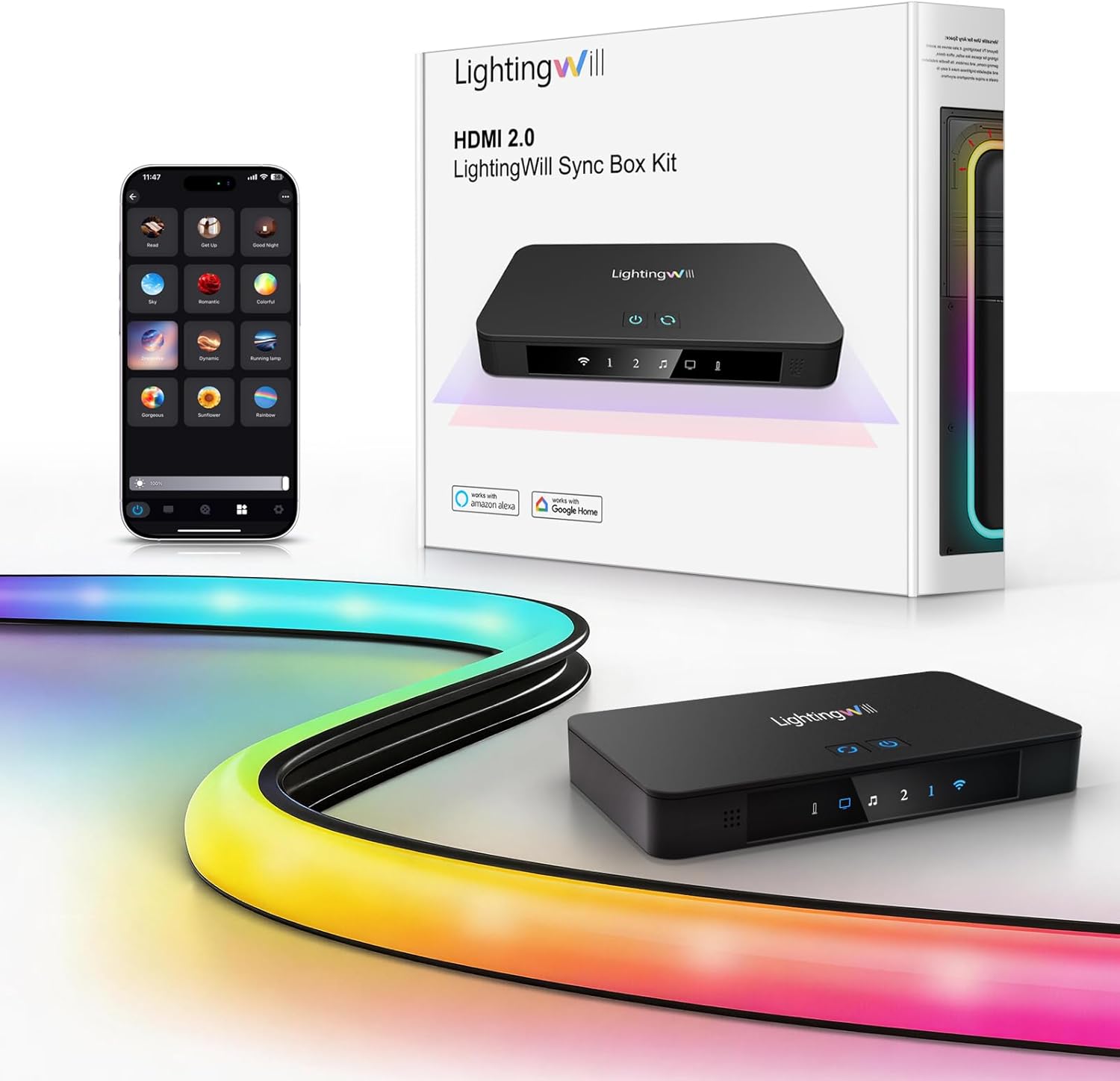 LightingWill CST2 16.4ft TV LED Backlight |
8.1/10 | $139.99 | Buy | |
 ROOKIELEDS HDMI 2.1 Sync Box R1 Backlight Kit |
8.1/10 | $149.99 | Buy | |
| Best Value |
 homilumi HDMI Sync Box with TV Backlight |
8.1/10 | $95.00 | Buy |
 Linkind HDMI 2.1 Sync Box 8K60Hz 4K120Hz |
8.1/10 | $129.99 | Buy | |
| Best Budget |
 PHILIPS Smart HDMI Sync Box with TV Backlight |
8.1/10 | $94.49 | Buy |
 Fancyleds 2.1 Fancy Sync Box HDMI 2.1 TV LED |
8.0/10 | $269.00 | Buy | |
 WiZ Connected HDMI Sync Box with TV Backlight |
7.9/10 | $66.00 | Buy |
Govee AI Sync Box 2 HDMI 2.1 for 75-85 Inch TVs
With HDMI 2.1 input, Govee's AI Sync Box 2 syncs a 75 to 85 inch TV's backlight to on-screen action at up to 8K/60Hz or 4K/144Hz. The RGBWIC strip adds white and color accuracy, while VRR, ALLM and Matter support round out a premium gaming-focused package. It suits gamers and home theater owners who want low-latency ambient lighting on large TVs.
Pros
- HDMI 2.1 with 8K and 4K 144Hz
- VRR and ALLM reduce tearing and latency
- RGBWIC strip for accurate color and white
- 75 LEDs per meter at 450 lumens per meter
- Matter support with voice control
Cons
- No automatic signal switching with multiple devices
- HDR can reduce light color saturation
- Not water resistant; indoor use only
Nexillumi HDMI LED Strip Lights 32.8ft
This 32.8ft RGB LED strip with HDMI sync box brings screen-matched colors to large TVs from 55 to 150 inches. Its 300 LEDs and app control through Bluetooth make it a budget-friendly choice for immersive backlighting without complex installation.
Pros
- Long strip for large TVs
- HDMI color sync
- App control via Bluetooth
- Bright 300 LEDs
- Easy adhesive installation
Cons
- Only 1080p resolution supported
- Requires TV box connection
- Not gradient chasing effect
LightingWill CST2 16.4ft TV LED Backlight
LightingWill's 16.4ft backlight kit pairs an RGBIC LED strip with an HDMI 2.0 sync box that processes 4K HDR at 60Hz from external players. The 60 LEDs per meter strip is made for 75 to 85 inch TVs and offers app, Alexa, and Google Assistant control. It suits home theater and gaming setups that use a console, streaming box, or PC rather than built-in smart TV apps.
Pros
- HDMI sync without camera calibration
- Supports 4K HDR at 60Hz
- 60 LEDs per meter reduces dark spots
- Two HDMI inputs and one output
- App, Alexa, and Google Assistant control
Cons
- Built-in TV apps do not support HDMI sync
- Color matching can be approximate on some content
- Indoor use only, not water resistant
ROOKIELEDS HDMI 2.1 Sync Box R1 Backlight Kit
The ROOKIELEDS HDMI 2.1 Sync Box R1 Backlight Kit brings dynamic lighting to TVs between 39 and 65 inches using an HDMI sync box with 48Gbps bandwidth. It supports 4K at 144Hz and 8K at 60Hz, making it a strong choice for gamers and home theater enthusiasts. The RGBCW-IC 5-color mixing delivers pure whites and vivid colors in sync mode, though it requires an external HDMI source and does not work with smart TV built-in apps.
Pros
- HDMI 2.1 sync box with 48Gbps bandwidth
- Supports 4K@144Hz and 8K@60Hz
- RGBCW-IC 5-color mixing for pure whites
- Compatible with VRR, ALLM, Dolby Vision, HDR10+
- Dream Sync multi-light color synchronization
Cons
- Requires external HDMI source
- No support for smart TV built-in apps
- Does not support DSC, eARC, or QMS
homilumi HDMI Sync Box with TV Backlight
This HDMI sync box analyzes incoming video signals to match TV backlight colors in real time with low latency. It supports multi-zone color control and works with Alexa and Google Assistant for hands-free operation. Ideal for those using external HDMI devices like game consoles or streaming sticks who want immersive ambient lighting.
Pros
- Real-time HDMI sync
- Multi-zone color control
- Smart app and voice control
- Works with major HDMI devices
- 2-year manufacturer warranty
Cons
- Requires external HDMI source
- Setup may need troubleshooting
- Lights may be too bright for dark rooms
Linkind HDMI 2.1 Sync Box 8K60Hz 4K120Hz
For those who want accurate TV backlighting without a camera, the Linkind HDMI 2.1 Sync Box captures colors directly from the HDMI source. It supports 8K@60Hz and 4K@120Hz with HDR10+ and Dolby Vision, preserving picture quality. The 20-foot trimmable strip fits TVs up to 90 inches, making it a solid choice for gaming and home theater setups.
Pros
- Direct HDMI sync for accurate colors
- HDMI 2.1 passthrough with VRR/ALLM
- HDR color correction for natural lighting
- Trimmable strip fits TVs up to 90 inches
- App and voice control with music sync
Cons
- Single HDMI input limits to one device
- Occasional sync issues requiring reset
- No support for built-in TV apps
PHILIPS Smart HDMI Sync Box with TV Backlight
This HDMI sync box adds real-time color-matching backlighting to 55-65 inch TVs, using an HDMI 2.0 connection for accurate sync with movies, music, and games. It supports 4K at 60Hz, HDR10+, and Dolby Vision, and is controlled via the WiZ app or voice assistants. Best for those who want immersive TV lighting without a camera-based system.
Pros
- Real-time HDMI sync with low latency
- Supports 4K, HDR10+, and Dolby Vision
- Easy WiZ app setup and customization
- Music sync via built-in microphone
- Expandable with other WiZ products
Cons
- Random screen blackouts reported
- Firmware update issues
- No syncing with smart TV apps
Fancyleds 2.1 Fancy Sync Box HDMI 2.1 TV LED
Designed for TVs 70 to 95 inches, this HDMI 2.1 sync box streams media and synchronizes a 96 RGBW LED per meter backlight with on-screen action. It supports 4K 144Hz and 8K 60Hz with VRR and ALLM, making it a strong choice for gamers and streamers using compatible HDMI devices.
Pros
- HDMI 2.1 with VRR and ALLM
- 96 RGBW LEDs per meter
- Universal power adapter included
- HDCP compliant for streaming
- 2-year manufacturer warranty
Cons
- Requires external HDMI device for sync
- Not recommended for PC use
- Smart TV apps not supported
WiZ Connected HDMI Sync Box with TV Backlight
For a clean, camera-free TV backlighting setup, the WiZ Connected HDMI Sync Box reads video signals directly from external HDMI sources to match colors in real time. It supports 4K at 60Hz, HDR10+, and Dolby Vision, and can expand the effect by linking additional WiZ smart lights. Ideal for movie nights and gaming with streaming sticks or consoles.
Pros
- Accurate HDMI-based color syncing
- Supports 4K 60Hz with HDR10+ and Dolby Vision
- Expandable with other WiZ smart lights
- No camera required for setup
- Works with Google Assistant and Alexa
Cons
- Requires external HDMI source, not compatible with smart TV apps
- Only one HDMI input (switcher needed for multiple devices)
- Indoor use only, not water resistant
Top 3 TV Backlights Without Camera Reviewed
#1 Govee HDMI 2.1 AI Sync Box 2: Best Overall
Why We Picked It
The Govee AI Sync Box 2 has the highest WikiHomeLED Score in this guide, based on a 4.4 out of 5 average from close to 700 Amazon ratings at the time of review. That is the largest base of buyer feedback among the HDMI 2.1 kits we compared. Its sync box uses HDMI 2.1 and is listed for up to 8K at 60Hz and 4K at 144Hz with VRR and ALLM support, so a current console or other HDMI 2.1 source can keep its high-refresh modes while the lights follow the picture.
The included strip uses RGBWIC LEDs, which add a dedicated white diode to the RGB mix, at a listed density of 75 LEDs per meter. Govee lists Matter support (lighting functions only) along with Alexa and SmartThings, and DreamView can sync the backlight with other Govee lights in the room. Compared with the LightingWill kit at #3, you pay more for the HDMI 2.1 passthrough and the wider smart home support.
Key Specifications
- Sync Method: HDMI 2.1 sync box, up to 8K 60Hz and 4K 144Hz
- Gaming Features: VRR and ALLM
- LED Type: RGBWIC, 75 LEDs/m
- TV Size Range: 75 to 85 inch TVs
- Smart Control: Govee app, Matter, Alexa, SmartThings
- Rating: 4.4/5 from 696 Amazon ratings (October 2026)
| Pros | Cons |
|---|---|
|
|
Things to Consider
Govee notes that when HDR, HDR10+ or Dolby Vision is on, the lights may look less saturated than the picture; the app has a saturation control to compensate. The listing also states that the box does not switch inputs automatically when more than one device is connected, so plan on switching manually if a console and a streaming box share it. As with every kit here, apps running on the TV itself will not trigger the sync effect.
Best For
Owners of 75 to 85 inch TVs who play on a current console or PC at high refresh rates and want the backlight to join an existing Matter, Alexa or SmartThings setup.
Skip It If
Skip it if your TV is smaller than 75 inches, you mostly stream from the TV’s built-in apps, or your sources never go above 4K at 60Hz, in which case an HDMI 2.0 kit such as the LightingWill below covers the same screen sizes. See the Govee HDMI 2.1 AI Sync Box 2.
#2 Nexillumi HDMI LED Lights for TV: Best Value
Why We Picked It
The Nexillumi kit ties the Govee on WikiHomeLED Score, with a 4.3 out of 5 average from more than 16,000 Amazon ratings, by far the largest base of buyer feedback in this guide. It is also one of the least expensive camera-free kits we found. The box includes the HDMI sync box, an HDMI cable, a USB cable and a 32.8-foot strip with 300 LEDs, and the listing rates it for TVs from 55 inches up.
The low price comes with real limits. Nexillumi states that the kit is designed for 1080p or lower and that the signal may drop if your source is set to 4K, so a 4K streaming box or console would need to output 1080p. The listing also notes that it is not a gradient effect light: it picks the brightest or most common color on screen and shows that, rather than different colors along each edge. Control runs through the “illumi home” app over Bluetooth only, with no voice assistant support listed.
Key Specifications
- Model: AML002_10M_HDMI
- Sync Method: HDMI sync box, 1080p or lower
- Strip: 32.8 ft, 300 LEDs
- TV Size Range: Listed for 55 inch and larger TVs
- Smart Control: illumi home app (Bluetooth)
- Rating: 4.3/5 from 16,185 Amazon ratings (October 2026)
| Pros | Cons |
|---|---|
|
|
Things to Consider
The resolution limit is the deciding factor. If your console or streaming box outputs 4K, you will have to lower it to 1080p for the sync to work reliably, which also lowers the picture going to your TV. The 32.8-foot strip is longer than most kits, so measure your TV’s perimeter before you stick it down. Because the app connects over Bluetooth, you need to be near the sync box to change settings.
Best For
Budget-focused shoppers with a large TV who watch mostly 1080p content from an external box and want a simple screen-following glow.
Skip It If
Skip it if you watch or play in 4K or HDR, want different colors along each edge of the screen, or plan to control the lights with Alexa or Google Assistant. Check the Nexillumi HDMI LED Lights for TV.
#3 LightingWill CST2 TV LED Backlight: Best Mid-Range Pick for 75 to 85 Inch TVs
Why We Picked It
The LightingWill CST2 scores just below the top two, with a 4.2 out of 5 average from more than 750 Amazon ratings. It sits between them on features. The HDMI 2.0 sync box handles 4K HDR at 60Hz, which covers most movies, streaming and sports, and it has two HDMI inputs and one output, so a streaming box and a console can both stay plugged in. The 16.4-foot RGBIC strip runs at 60 LEDs per meter and can show several colors at once across different zones.
Compared with the Govee at #1, it gives up HDMI 2.1 passthrough, so 4K at 120Hz or 144Hz modes are not supported, and its strip has no dedicated white diode. In return it costs considerably less, and unlike the Nexillumi it works at 4K and supports Alexa and Google Assistant.
Key Specifications
- Model: CST2
- Sync Method: HDMI 2.0 sync box, 4K HDR at 60Hz
- Ports: 2 HDMI inputs, 1 HDMI output
- Strip: 16.4 ft RGBIC, 60 LEDs/m
- TV Size Range: 75 to 85 inch TVs
- Smart Control: LightingWill app, Alexa, Google Assistant
- Rating: 4.2/5 from 756 Amazon ratings (October 2026)
| Pros | Cons |
|---|---|
|
|
Things to Consider
LightingWill states that built-in smart TV apps, including Netflix, YouTube, Disney+ and Prime Video, do not support screen sync, so streaming has to come from an external device connected through the box. The strip mounts with adhesive backing and clips; check that your TV falls within the 75 to 85 inch range before ordering.
Best For
Owners of 75 to 85 inch TVs who watch in 4K at 60Hz, use more than one HDMI source, and want zone effects and voice control without paying for HDMI 2.1.
Skip It If
Skip it if you play at 4K 120Hz or higher, your TV is under 75 inches, or you want a strip with dedicated white LEDs. See the LightingWill CST2 TV LED Backlight.
How to Choose a TV Backlight Kit
Sync Method and HDMI Compatibility
The sync method is the foundation of a camera-free TV backlight. Every kit here uses an HDMI sync box that sits between your video source (like a game console) and your TV, reading the signal to drive the lights. The key differentiator is the HDMI version. HDMI 2.0 boxes support 4K at 60Hz, which is enough for most movies and streaming. HDMI 2.1 boxes, like our top pick, support higher bandwidth for 4K at 120Hz or 144Hz and 8K at 60Hz, which matters for current consoles and high-refresh-rate content. If VRR (Variable Refresh Rate) and ALLM (Auto Low Latency Mode) are important to you, confirm the box lists them.
Matching Kit Size to Your Screen
An improperly sized LED strip can leave dark gaps in the corners or require awkward coiling. Manufacturers specify a TV size range (for example, 55 to 65 inches) or a strip length (for example, 16.4 feet). Measure the perimeter of your TV before purchasing. A strip that is too short will not cover every edge, while one that is too long can often be trimmed at marked cutting points. Higher LED density (LEDs per meter) generally gives a smoother glow with fewer visible dots between diodes.
Color and White Light Quality
Look at the LED type used in the strip. Basic RGB strips mix white from red, green and blue, which often looks slightly tinted. RGBIC strips can display multiple colors at once for gradient and zone effects. RGBWIC and RGBCW strips add dedicated white LEDs for cleaner whites and adjustable color temperature when you are not using sync mode. If you watch a lot of HDR content, check whether the app lets you adjust color saturation, since several makers note the lights can look less saturated with HDR on.
Smart Platforms and Control
Consider how you want to control your lights. Most kits include a brand app for scene selection and music sync modes. For deeper smart home integration, look for Amazon Alexa, Google Assistant, or Matter support, which lets one device work across several ecosystems. Some budget kits use Bluetooth-only apps, so you need to be near the sync box, while Wi-Fi kits can be controlled from anywhere in the house.
Mounting, Power, and Installation
Most LED strips come with adhesive backing for mounting directly to the back of your TV; clean and dry the surface before applying. The sync box sits near your media devices and needs a power outlet. Check the included cables, since you may need a longer HDMI cable depending on your cabinet layout. Count your HDMI sources too: some boxes have a single input and need a separate HDMI switcher for more than one device.
How We Evaluate TV Backlight Kits
Our rankings are based on manufacturer specifications, Amazon listing details and buyer ratings, gathered in October 2026. Each kit’s position follows its WikiHomeLED Score, which adjusts the Amazon star average for the number of ratings behind it, as explained on our How We Review page. For camera-free kits we then compare HDMI version and supported passthrough modes, strip length and LED density against the listed TV size range, and app and smart home support. We have not installed these kits ourselves; every detail here comes from published listings. We left out one kit that had no buyer ratings yet at the time of review. Before you buy, confirm the size range against your TV and make sure you have an external HDMI source to connect.
Frequently Asked Questions
Do TV backlights without a camera work with my smart TV’s built-in apps?
No. These kits require an external HDMI source device, such as a game console, streaming stick, cable box, or Blu-ray player, connected through the sync box. The sync box reads the video signal from that device to drive the lights. Apps built into your smart TV never pass through the box, so they cannot trigger the sync effect.
Can I control these TV backlights with voice assistants?
Many can. Several kits in this guide list Amazon Alexa and Google Assistant support, and the Govee AI Sync Box 2 also lists Matter. Some budget kits, such as the Nexillumi, use a Bluetooth app only. Check each product’s control options before buying if voice control matters to you.
How do I know what size kit to get for my TV?
Manufacturers give a recommended TV size range based on the length of the included strip. The most reliable method is to measure the total perimeter of your TV and compare it with the strip length in the listing. A kit sized for your TV will reach every edge without large gaps or excess strip.
Are these kits difficult to install?
Most kits are designed for DIY installation. The strip has adhesive backing for the back of your TV, and the sync box connects between your HDMI source and your TV. The main steps are cleaning the back of the TV, routing the strip along the edges, connecting the HDMI cables, and plugging in the power adapter.
What’s the difference between HDMI 2.0 and HDMI 2.1 sync boxes?
The main difference is bandwidth. An HDMI 2.0 sync box generally supports 4K video at up to 60Hz, which is fine for most movies and streaming. An HDMI 2.1 sync box supports 4K at 120Hz or 144Hz and 8K at 60Hz, along with gaming features like VRR and ALLM. If you play on a PlayStation 5, Xbox Series X, or a high-refresh-rate PC and want to keep those modes, choose an HDMI 2.1 box.
Final Verdict
For most people with a 75 to 85 inch TV, the Govee HDMI 2.1 AI Sync Box 2 is the strongest camera-free kit in this guide: it passes through 4K at 144Hz, has a strip with dedicated white LEDs, and has the most buyer ratings of any HDMI 2.1 kit here. If you mostly watch 1080p content and want to spend as little as possible, the Nexillumi HDMI LED Lights for TV has a very large base of buyer feedback, as long as you accept its 1080p limit and single-color effect. The LightingWill CST2 TV LED Backlight sits in between for 4K at 60Hz setups with more than one HDMI source. Whichever you choose, you need an external HDMI device, since no camera-free kit can sync with apps running on the TV itself.
About the author
Ethan Cole leads research and editing at WikiHomeLED, comparing LED lighting for the home through manufacturer specs, manuals, safety listings and owner feedback. Every product is scored against the criteria on our How We Review page, and picks are updated when models change.