
Philips Hue Sync Box 4K vs 8K: Which One Do You Need?
Philips sells three Hue Play HDMI Sync Boxes on Amazon: the original 4K box, the 8K box, and a new compact 4K box. We compare HDMI support, inputs, Bridge needs, and who needs which.
 By Ethan Cole
Updated October 30, 2026
The Hue Play HDMI Sync Box is what makes Philips Hue TV lights follow the picture: your devices plug into the box, it passes video to the TV, and it reads the colors to drive Hue lights. Philips now lists three boxes on Amazon. The original Hue Play HDMI Sync Box (4K), the Hue Play HDMI Sync Box 8K, and a newer, compact Hue Play HDMI Sync Box 4K. They differ in HDMI version, inputs, HDR formats, and whether a Hue Bridge is required.
All three share one limit, which Philips states on every listing: they sync only with HDMI devices, not with apps built into a smart TV.
Quick Answer
Get the 8K box if you game on a PS5, Xbox Series X, or PC that outputs 4K at 120Hz, or you want the most future headroom. The original 4K box is fine for streaming boxes and 4K at 60Hz content, and has by far the most ratings. The new compact 4K box is the only one that can sync a single light over Bluetooth without a Bridge, but it has very few ratings so far.
Side-by-Side Comparison
| Hue Sync Box 8K | Hue Sync Box (original 4K) | Hue Sync Box 4K (compact) | |
|---|---|---|---|
| Video | HDMI 2.1: 8K at 60Hz, 4K at 120Hz | 4K | 4K at 60Hz |
| HDR | Dolby Vision, HDR10+ | Dolby Vision, HDR10+ | HDR10, HDR10+ |
| HDMI inputs | Up to 4 devices | 4 inputs | Not stated on the listing |
| Hue Bridge | Required | Required | Optional: 1 light over Bluetooth without; up to 10 lights with a Bridge |
| Lights synced | Up to 10 | Not stated on the listing | Up to 10 with a Bridge |
| Voice and smart home | Alexa, Google Assistant, Apple HomeKit | Alexa, Google Assistant, Apple HomeKit; Matter through the Bridge | Alexa, Google Home, Apple Home |
| Listed size | 7.87 x 4.25 x 0.98 in | 7.2 x 3.9 x 0.9 in | 3.43 x 3.43 x 4.61 in |
| Amazon rating (October 29, 2026) | 4.1 (350+) | 4.1 (3,400+) | 3.1 (10) |

Philips Hue Play HDMI Sync Box 8K, 1-Pack


As an Amazon Associate we earn from qualifying purchases. Product prices and availability are accurate as of the date/time indicated.
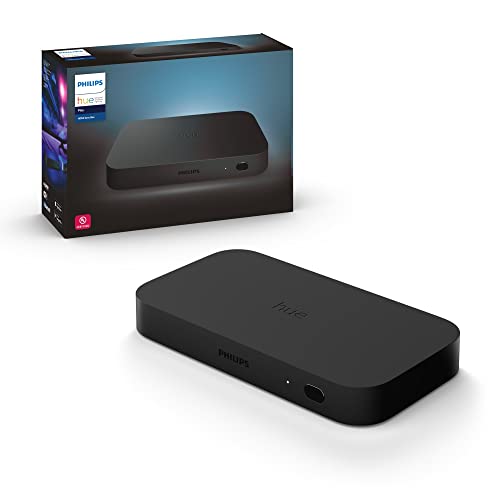
Philips Hue Play HDMI Sync Box


As an Amazon Associate we earn from qualifying purchases. Product prices and availability are accurate as of the date/time indicated.

Philips Hue Play HDMI Sync Box 4K, Smart Lighting


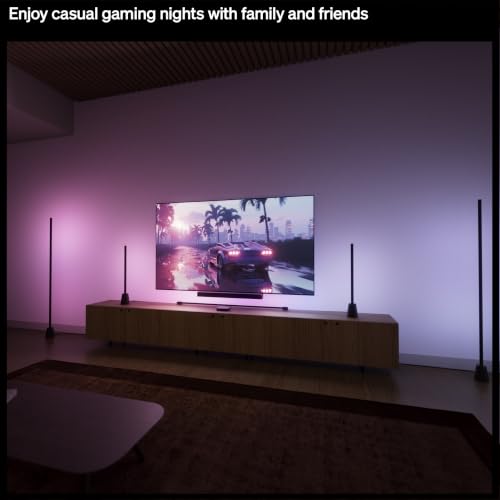


As an Amazon Associate we earn from qualifying purchases. Product prices and availability are accurate as of the date/time indicated.
Gaming and HDMI 2.1
For current consoles this is the deciding point. Philips lists the 8K box as HDMI 2.1 with 4K at 120Hz, so a PS5 or Xbox Series X can pass through at high refresh rates. The compact 4K box lists 4K at 60Hz, and the original box lists 4K without a 120Hz figure. If your console runs at 120Hz into the TV today, a 4K box in the middle would limit it. More gaming options are in TV backlights for gaming.
HDR Formats
The 8K and original boxes list Dolby Vision and HDR10+. The compact 4K box lists HDR10 and HDR10+ but not Dolby Vision. If your streaming device and TV use Dolby Vision, choose one of the first two.
Bridge or No Bridge
The 8K and original boxes require a Hue Bridge. The compact 4K box can sync one Hue light over Bluetooth without a Bridge, and up to 10 with one. That makes it the simplest way to try a single lightstrip, such as the Hue Play Gradient Lightstrip, with screen sync. For a room full of Hue lights, you will want the Bridge either way.
Inputs and Setup
The 8K and original boxes take four HDMI devices, which suits a console, a streaming box, and a disc player on one TV input. The compact box’s listing does not state an input count, so check the box details before you plan your setup around it. Every box needs to sit between your devices and the TV.
Price and Value
At the time of review the compact 4K box was the lowest listed of the three and the 8K box the highest. The original 4K box has the longest rating record, more than 3,400 ratings. The compact box’s 3.1 average comes from only 10 ratings, too few to judge. Prices change, so compare current listings.
Which One Should You Buy?
- PS5, Xbox Series X, or a 120Hz PC: Sync Box 8K.
- Streaming box and Dolby Vision at 4K 60Hz, existing Bridge: original Sync Box.
- One Hue lightstrip, no Bridge yet: compact Sync Box 4K.
- Most of your viewing is in the TV’s own apps: none of them; a camera kit fits better, see Govee vs Philips Hue.
Who Should Look Elsewhere
If you are not on Hue, a single HDMI kit such as the Govee AI Sync Box 2 includes its own strip and needs no bridge. HDMI kits across brands are in TV backlights without a camera.
How We Compared Them
We did not install these boxes. We compared Philips’ Amazon listings for all three, with ratings checked October 29, 2026. Where a listing does not state a figure, we say so rather than fill it in. Our full method is on the How We Review page.
Final Verdict
The 8K box is the one to buy for current consoles and the longest useful life. The original 4K box remains a sound choice for 60Hz streaming with Dolby Vision. The compact 4K box is a low-cost entry to Hue sync without a Bridge, but wait for more ratings if you can.
Check current pricing and availability for the Philips Hue Play HDMI Sync Box 8K.
Check current pricing and availability for the Philips Hue Play HDMI Sync Box.
Check current pricing and availability for the Philips Hue Play HDMI Sync Box 4K.
Frequently Asked Questions
Do I need the 8K Sync Box if I do not have an 8K TV?
The 8K label matters less than HDMI 2.1. Its useful feature for most people is 4K at 120Hz passthrough for consoles.
Does any Hue Sync Box work with smart TV apps?
No. Philips states on each listing that the boxes sync only with HDMI devices.
Does the Hue Sync Box need a Bridge?
The 8K and original boxes do. The compact 4K box can sync one light over Bluetooth without one.
How many HDMI devices can I connect?
Four on the 8K and original boxes. The compact 4K box’s listing does not state a number.
About the author
Ethan Cole leads research and editing at WikiHomeLED, comparing LED lighting for the home through manufacturer specs, manuals, safety listings and owner feedback. Every product is scored against the criteria on our How We Review page, and picks are updated when models change.