
Philips Hue Play Gradient Lightstrip Review
The Hue Play Gradient Lightstrip is a TV backlight built for a Hue system. We review what it does on its own, what the Bridge and HDMI Sync Box add, and who should look elsewhere.
 By Ethan Cole
Updated October 29, 2026
The Philips Hue Play Gradient Lightstrip is the TV backlight most people picture when they think of Hue entertainment lighting: a strip on the back of the TV that shows several colors at once and, with the right extras, follows the picture. The catch is in the word extras. On its own the strip is a smart light. To sync with what is on screen, Philips states that it needs a Hue Bridge and a Hue Sync Box, both sold separately.
This review covers the 65 inch lightstrip (also sold in 55 and 75 inch sizes), what each add-on does, how it compares with camera kits from Govee and Nanoleaf, and who should skip it. For every brand side by side, see our guide to the best TV backlights.
Our Verdict
The Gradient Lightstrip makes sense for one buyer: someone who already runs Philips Hue in the room, or plans to, and whose movies and games come through HDMI devices. For that buyer it joins the same app, scenes, and automations as the rest of the house, and the Sync Box reads the HDMI signal rather than pointing a camera at the screen.
For everyone else it is an expensive way to get screen sync. A camera kit such as the Govee TV Backlight 3 Lite needs no bridge or box and syncs the TV’s built-in apps, which the Hue HDMI route cannot. The 65 inch strip holds 4.2 stars on more than 2,300 Amazon ratings at the time of review (October 29, 2026).
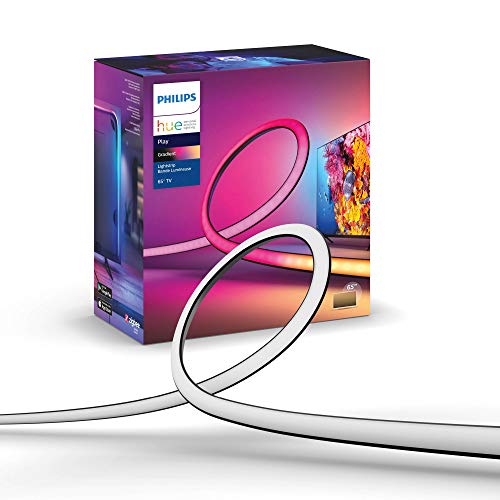
Philips Hue Play Gradient 65" Smart TV Light Strip


As an Amazon Associate we earn from qualifying purchases. Product prices and availability are accurate as of the date/time indicated.
Key Specifications
| Feature | Specification (per Philips’ listing) |
|---|---|
| Sizes | 55, 65, and 75 inch versions; this review covers the 65 inch strip |
| Fit | Mounting brackets for 65 inch TVs; Philips’ 8K bundle lists the 65 inch strip for 65 to 70 inch TVs |
| Light | White and Color Ambiance: warm to cool white plus millions of colors |
| Effect | Gradient: several colors along the strip at once |
| Screen sync | Requires a Hue Bridge and a Hue HDMI Sync Box, both sold separately |
| Voice | Alexa and Google Assistant, set up in the Hue app |
| Listed package size and weight | 11.4 x 0.67 x 0.63 in, about 1.9 lb |
| Rating | 4.2/5 from 2,352 Amazon ratings (October 2026) |
What You Need for Screen Sync
This is the most important part of the purchase, because the strip alone does not follow the picture.
- Hue Bridge: the hub that connects Hue lights. Philips lists it as required for the strip to sync with movies, music, and games.
- Hue Play HDMI Sync Box: your streaming box, console, or Blu-ray player plugs into it, and it passes video to the TV while reading the colors. Philips sells a 4K box and an 8K box; we compare them in Hue Sync Box 4K vs 8K.
- HDMI sources: the Sync Box syncs only what runs through HDMI. Philips states plainly that it does not sync with smart TV apps.
So if you watch mostly in the TV’s own Netflix or YouTube app, the HDMI route will not follow those shows unless you move playback to an external streaming device. Camera kits do not have this limit, see TV backlights with a camera.
Philips also sells newer Hue Play Gradient Strip Light models (a standard version and a Pro) that list syncing through the Hue Sync app, Hue Screen Sync, or an HDMI Sync Box. They had only a handful of ratings when we checked, so this review stays with the established lightstrip.
Color and Light Quality
Gradient means the strip is divided into segments that each show their own color, so the left side of the wall can glow orange while the right glows blue. That is what makes a backlight look like it extends the picture rather than tinting the wall one shade.
The White and Color Ambiance range includes warm and cool white, which matters more than it sounds: a lot of video is white, gray, or skin tone, and a strip with real white light renders those scenes more cleanly than RGB-only strips. Philips does not publish an LED count or lumen figure for this strip on the listing, so we cannot compare brightness by the numbers.
Installation
The strip attaches to the back of the TV with included mounting brackets that let it bend around corners. Because it is sized to one screen size, buy the version that matches your TV; Philips’ bundle listing gives 65 to 70 inches for the 65 inch strip.
The Sync Box adds cabling: each HDMI source goes into the box, and one cable runs from the box to the TV. Plan where the box will sit and check that your TV’s HDMI input supports what your console outputs. For gaming at high refresh rates, the 8K box is the one Philips lists as HDMI 2.1.
App and Smart Home
Setup runs through the Hue app, where the strip joins an entertainment area with other Hue lights. That is the strongest reason to choose Hue: lamps, ceiling lights, and the TV strip can all react together, and the same lights run on schedules and automations the rest of the day.
Voice control with Alexa and Google Assistant is set up in the Hue app. The Hue Sync Box listings also name Apple Home. If you want Alexa-first options from other brands, see TV backlights that work with Alexa.
How It Compares
| Hue Play Gradient Lightstrip | Govee TV Backlight 3 Lite | Nanoleaf 4D V2 | |
|---|---|---|---|
| Sync method | HDMI Sync Box (sold separately) | Camera (included) | Camera (included) |
| Extra hardware for sync | Hue Bridge and Sync Box | None | None |
| Syncs built-in TV apps | No | Yes | Yes |
| White light | Warm to cool white | Added warm white chip | Not stated |
| Listed TV size | 55, 65, or 75 inch versions | 55 to 65 or 75 to 85 inch | Up to 65 inch |
| Amazon rating (at review) | 4.2 (2,300+) | 4.5 (10,600+) | 4.2 (49) |
At the time of review the Hue route was the most expensive of the three once the Bridge and Sync Box were counted, and the Govee 3 Lite was the lowest listed. Prices change, so compare current listings. Head-to-head details are in Govee TV backlight vs Philips Hue and our Nanoleaf 4D review.
Pros and Cons
| Pros | Cons |
|---|---|
|
|
Who Should Buy It
Buy it if your home already runs on Hue, your viewing comes through a streaming box or console, and you want the TV strip to work with your other Hue lights.
Who Should Look Elsewhere
Look elsewhere if you do not own a Hue Bridge, watch mostly in the TV’s own apps, or want screen sync from one box at the lowest cost. A camera kit is the simpler choice, and our TV backlights for 65 inch TVs guide compares several.
How We Reviewed It
We did not install this lightstrip. We reviewed Philips’ Amazon listings for the lightstrip, the Sync Boxes, and the newer Gradient Strip Light models, and compared them with the listings of competing kits. Ratings were checked October 29, 2026. Our full method is on the How We Review page.
Final Verdict
The Hue Play Gradient Lightstrip is a good fit inside a Hue home and a poor value outside one. If you already have the Bridge and watch through HDMI devices, it is the most integrated choice. If not, a camera kit gets you screen sync with one purchase.
Check current pricing and availability for the Philips Hue Play Gradient Lightstrip (65 inch).
Frequently Asked Questions
Does the Hue Play Gradient Lightstrip work without a Sync Box?
Yes, as a smart light: it shows colors, white, and scenes from the Hue app and responds to voice. It will not follow the picture without the Hue Sync Box and Bridge, per Philips.
Does the Hue Sync Box work with TV apps like Netflix?
No. Philips states the HDMI Sync Box syncs only with HDMI devices, not with smart TV apps. Use an external streaming device, or choose a camera kit.
Which size should I buy?
Match the strip to your TV size. Philips’ 8K bundle lists the 65 inch strip for 65 to 70 inch TVs.
Is the Hue lightstrip worth it over Govee?
Only if you are invested in Hue or prefer HDMI sync without a camera. For most buyers starting from scratch, a Govee camera kit costs less and syncs every source.
About the author
Ethan Cole leads research and editing at WikiHomeLED, comparing LED lighting for the home through manufacturer specs, manuals, safety listings and owner feedback. Every product is scored against the criteria on our How We Review page, and picks are updated when models change.