
Philips Hue Gradient PC Lightstrip Review
The Hue Gradient PC Lightstrip brings Philips Hue color to the back of a 24 to 27 inch monitor. We review what it needs and who it makes sense for.
 By Ethan Cole
Updated October 30, 2026
The Philips Hue White and Color Ambiance Gradient PC Lightstrip (model 578294 on the listing) is a monitor backlight made for 24 to 27 inch screens. Like the larger Hue gradient strips for TVs, it can show several colors along its length at once, and it is controlled by the same Hue app as the rest of a Hue system.
The catch, as with most Hue products, is the hub: Philips states the strip requires a Hue Bridge. This review covers what that means, how the strip follows the screen, and who should look elsewhere. For every monitor kit side by side, see our guide to the best monitor backlights.
Our Verdict
Buy it if you already run Philips Hue at home and want the light behind your monitor to belong to the same system, with the same app, scenes, and voice assistants. It has the highest WikiHomeLED Score of the screen-sync monitor kits we compared, 4.4 stars on about 150 Amazon ratings at the time of review (October 30, 2026).
Skip it if you have no Hue Bridge. Adding one raises the cost well past USB monitor kits that do the core job for much less, and the strip is listed only for 24 to 27 inch screens.

Philips Hue White and Color Ambiance Gradient PC





As an Amazon Associate we earn from qualifying purchases. Product prices and availability are accurate as of the date/time indicated.
Key Specifications
| Feature | Specification (per Philips’ listing) |
|---|---|
| Listed monitor size | 24 to 27 inch |
| Light | White and Color Ambiance, gradient (several colors at once) |
| Hub | Hue Bridge required |
| Voice and smart home | Alexa, Google Assistant, Apple HomeKit; Matter mentioned through the Hue system |
| Mounting | Mounts included, designed to bend around corners |
| Color | Black |
| Model on listing | 578294 |
What You Need
- The lightstrip itself, sized for 24 to 27 inch monitors
- A Philips Hue Bridge, which Philips states is required and is sold separately
- The Hue app on your phone, for setup and control
- Philips’ Hue Sync app on your computer, which is how Hue lights follow what is on a PC or Mac screen
Philips’ listing says you use the app to set how the lights react to content on your monitor. Philips offers its Hue Sync desktop app for Windows and macOS for this purpose. Because sync runs on the computer, a console plugged straight into the monitor will not drive the lights.
Color and Light
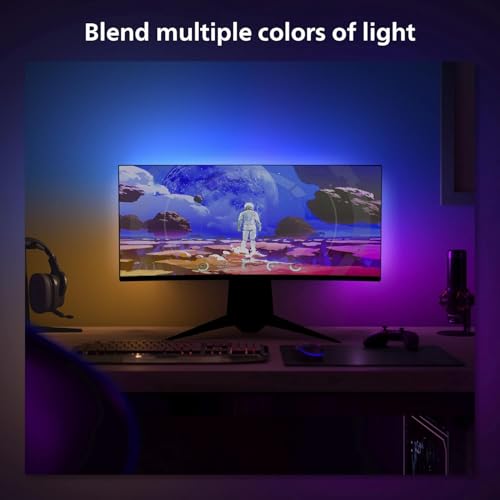
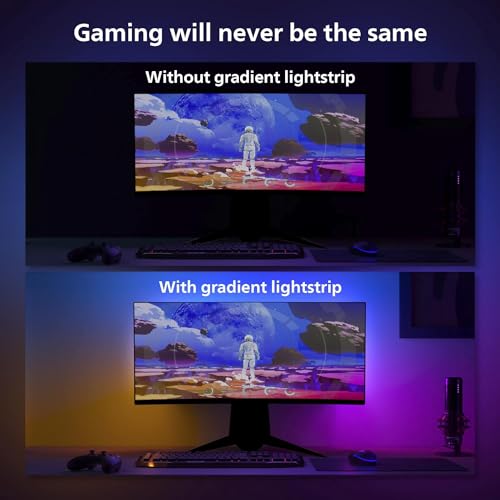
Gradient strips are the Hue line’s answer to RGBIC: instead of one color along the whole strip, sections can show different colors and blend between them. Behind a monitor, that lets the left edge of the wall glow a different color from the right, following the picture. As a White and Color Ambiance product, it also does a range of whites, so it can work as a calm white bias light when you are not gaming.
Installation
The strip attaches to the back of the monitor with the included mounts, which Philips says let you bend it around the corners. There is no camera to mount and nothing in front of the screen.
Pros and Cons
| Pros | Cons |
|---|---|
|
|
How It Compares
The Govee G1 needs no hub, is listed for 27 to 34 inch and curved screens, and has many more ratings, but does not join a Hue system. See Govee G1 vs Philips Hue Gradient PC.
If you also want Hue behind your TV, the Hue Play Gradient Lightstrip for TVs uses the same bridge and app.
Who Should Buy It
- Hue owners who want the monitor glow to match the room
- People who want voice control and automations for their desk light
- Anyone with a 24 to 27 inch monitor who wants one strip for both white and color light
Who Should Look Elsewhere
- Buyers with no Hue Bridge who just want screen sync
- Owners of 32 inch or ultrawide monitors
- Console players using the monitor as their main screen
Check current pricing and availability for the Philips Hue Gradient PC Lightstrip.
How We Evaluated It
We did not install this strip ourselves. The review is based on Philips’ Amazon listing, Philips’ published Hue Sync app information, and the product’s rating history at the time of review, compared on the same criteria as every kit in our monitor backlights category. Our method is on the How We Review page.
Frequently Asked Questions
Does the Hue Gradient PC Lightstrip need a Hue Bridge?
Yes. Philips states on the listing that it requires a Hue Bridge.
How does it sync with my monitor?
Through Philips’ Hue Sync app on your computer, which reads the screen and sends colors to Hue lights through the bridge.
Will it fit a 32 inch monitor?
Philips lists it for 24 to 27 inch monitors. For larger screens, look at kits sold in 32 or 34 inch versions in our monitor backlight guide.
Does it work with Apple HomeKit?
Philips lists Alexa, HomeKit, and Google Assistant compatibility through the Hue system.
About the author
Ethan Cole leads research and editing at WikiHomeLED, comparing LED lighting for the home through manufacturer specs, manuals, safety listings and owner feedback. Every product is scored against the criteria on our How We Review page, and picks are updated when models change.